Probably Stolen Machines, Furnace and Modules
Check the inputs, power and work requirement before spending another night on a stalled production job.
For the 3D Printer, release-era players report that materials and batteries let it work overnight, and that a running job locks module changes until it finishes. Performance affects work per night, Efficiency affects power use, and Quality affects output quality where that machine uses it. Check the individual machine: a Furnace does not necessarily benefit from the same upgrades as a printer.
Evidence: November 1 replies in a release-era Steam thread, alongside clearly marked pre-release module and Furnace references. Nothing here has been reproduced by this site in game. The machine references were checked November 3, 2026; the early-game budget references were reviewed November 2.
What to check when a machine is not producing
The Gunsmith thread gives a useful troubleshooting order for the 3D Printer. Apply the checks to the requirements shown by your own machine; this is not a universal recipe.
- Read the recipe or chip. Check the material and total work required. A loaded machine can still need more than one night.
- Check the inputs and battery. The poster describes adding both materials and batteries before overnight production starts.
- Read actual work per night after modules. A penalty can push completion into an extra night even when it looks small.
- Let the job finish before swapping a locked module. The reply does not provide a verified cancel-job shortcut.
Performance, Efficiency and Quality
| Stat | What the release-era printer reply says | What to check |
|---|---|---|
| Performance | Changes work generated overnight | Compare work per night with the job’s total work requirement. |
| Efficiency | Changes power consumption | Read the modified energy demand, not just the module’s percentage. |
| Quality | Changes output quality when applicable | Check whether the selected machine or output actually uses that stat. |
These descriptions come from one November 1 poster. An August module discussion advises reading the note-like panel on the machine’s right for its specific effects. Another reply there says Performance did nothing for the Furnace; September’s machinery guide says the same. That agreement is pre-release evidence, not a fresh test of 1.0.
For machine-specific upgrades, use the chemical machine guide and Water Purifier guide. Their temperature and purity rules should not be transferred to unrelated machines.
3D Printer: why two nights can become three
One November 1 reply by Magic describes a chip needing 50 work and 2 units of 3D material. They report a base printer doing 25 work per night, but a module in the Gunsmith starting printer reducing that to 24. At 25, two nights supply 50 work; at 24, they supply only 48, requiring a third night. This arithmetic explains that player’s example; another chip or module arrangement can have different values.
In the same thread a player asks how to change a module while the printer says it is locked, after trying to remove the battery and materials. Magic’s answer is to wait for production to finish. An earlier poster suggests the same but explicitly hedges, so this page treats it as a community troubleshooting answer rather than a confirmed rule for every machine.
Furnace: metal inputs and junk processing
A release-era player in the Gunsmith thread mentions a junk-to-scrap Furnace module. The detailed recipe reference below is older: Machinery and You, by The Exceptional Fisherman, published in September before the October 28 release.
Pre-1.0 reference: the following recipes have not been re-tested in the release build. Compare them with your current machine’s recipe and installed module before using valuable stock.
| Setup | September guide’s report |
|---|---|
| Ordinary Furnace | Two scrap give low-purity ingots; scrap plus metal ore gives fair purity; two metal ore give high purity. |
| Blast module | Three material inputs produce two ingots instead of the ordinary two-input recipe. |
| Junk Processing | Six junk become four scrap metal. The guide says Quality has no effect on this module. |
The developer’s 2026-08-07 Playtest patch fixed a Junk Processing bug that consumed twice the power shown. That is a historical fix, not evidence that the release build still has it. The old guide’s machine prices, energy numbers and flux thresholds are not treated here as current 1.0 values.
Power, containers and the machine interface
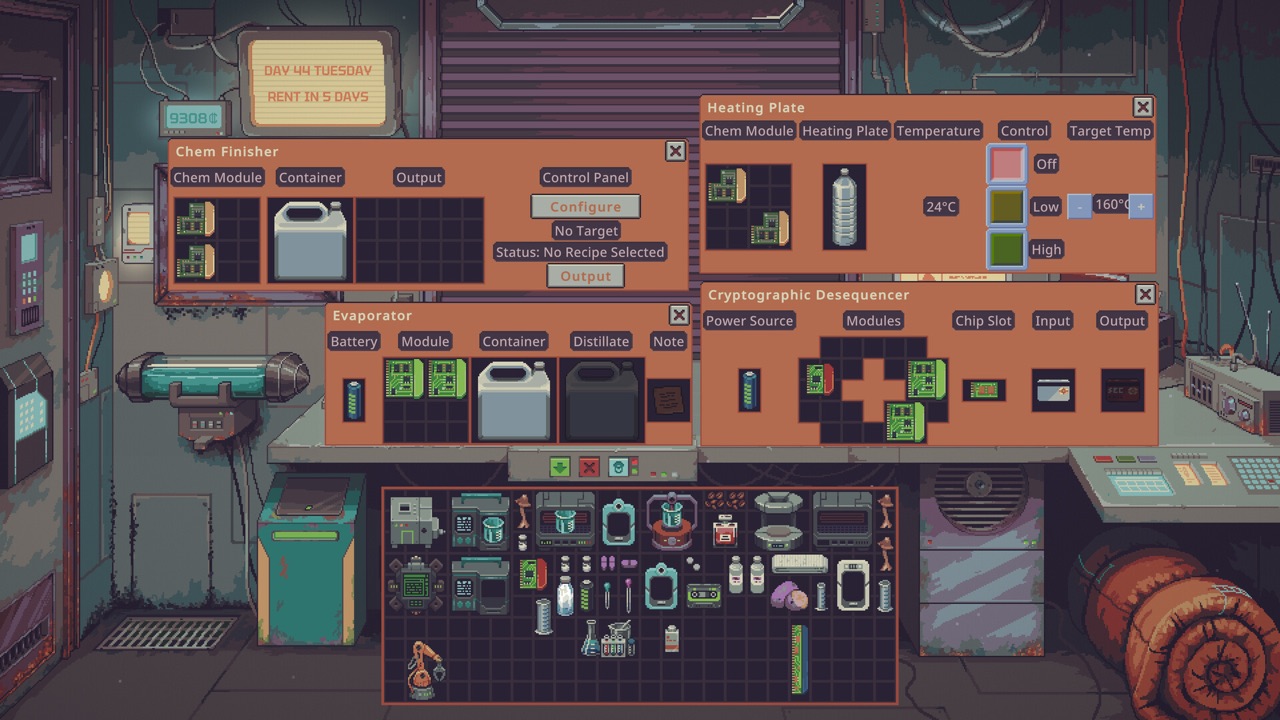
This official pre-release screenshot shows separate controls and slots on chemical machines and the Cryptographic Desequencer. It is a useful reminder to inspect the actual machine interface; it does not establish current power costs, a universal slot layout or what every Machine Bay can hold.
A release-era early-game guide describes electricity as a separate service with its own bill. Another Rock Bottom player delayed paying for it until acquiring machines that needed it. That budget decision is distinct from the printer thread’s battery check: the sources used here do not establish that a paid service replaces a machine’s battery.
Budget for inputs and power before buying a production line. The money guide covers rent and buying the store; water, chemistry and fish farming cover their own production steps.
Probably Stolen machine FAQ
What do Performance, Efficiency and Quality modules do?
In a November 1 release-era Steam reply, one player explains that Performance changes overnight work, Efficiency changes power consumption, and Quality changes output quality where applicable. Effects depend on the machine: a pre-release guide and an August forum reply both say Performance did nothing for the Furnace. Read the particular machine’s information panel rather than assuming every stat helps it.
Why is my 3D Printer locked in Probably Stolen?
A November 1 Steam reply says to wait until the production job finishes before changing modules. Removing the battery and materials did not solve it for the player asking the question. This is a community answer for that printer, not a tested way to unlock every machine or cancel a job.
Why does printing a pistol take three nights?
One release-era poster describes a recipe requiring 50 work and 2 units of 3D material. A base printer doing 25 work per night would finish in two nights, but their Gunsmith starting module reduced it to 24, so two nights only gave 48 work and a third was needed. These are that poster’s figures, not universal printer or recipe values.
Can the Furnace turn junk into scrap?
A November 1 player mentions using a junk-to-scrap module in the Furnace. A September guide calls it Junk Processing and lists 6 junk to 4 scrap, but that ratio predates 1.0 and has not been re-tested here. Check the installed module’s current recipe before committing materials.
Sources
- Starting as Gunsmith — Steam Community discussion — October 28 release thread; November 1 replies by Magic (#11 and #12) and Hot_Miami (#10), checked 2026-11-03. Each operational claim is attributed; no site test.
- Module Bonuses — Steam Community discussion — August 9 Playtest discussion; machine information panel and machine-specific stat exceptions. Historical evidence, not 1.0 validation.
- Machinery and You — The Exceptional Fisherman, Steam Community guide — September guide adapted from Discord, before 1.0; used only for the explicitly historical Furnace recipe reference and stat exception.
- 诺布诺布 — 开荒顺序与投资取舍, Steam Community guide — reviewed 2026-11-02; the challenge-difficulty report of a separate electricity service and bill
- TowerNumberNine — From Nothing, The Hard Way, Steam Community guide — reviewed 2026-11-02; one Rock Bottom/Thin Margins run that delayed power payments until powered machinery was needed
- Official Steam screenshots — pre-release machine interfaces; not a current price, power or recipe database
- Playtest Patch 48.3.12 — The Rat Wrangler — official Steam historical news feed, rechecked 2026-11-03; the August 7 Playtest announcement fixes Junk Processing’s displayed power mismatch